 OmniDoc Document Extraction
Document structure extraction
Get the headings, paragraphs, tables and images of a PDF, a scan or an Office file in the order and hierarchy of the original, as Markdown and JSON you can use right away.
Start extracting for freeDesktop app: no page limitUp to 21 pages per PDF and no monthly cap; free jobs wait in a queue. For longer files or when you are in a hurry, the OmniDoc desktop app has no page limit and no queue.
How it works
Upload a file
Sign in with an OmniDoc account and drop the file on the page.
Extract
PDFs, scans and images go through layout analysis, text recognition and table recognition; Office files, e-books and web pages are parsed directly.
Download
Download a ZIP with Markdown, JSON and the images. The job runs in the background, so you can close the page.
What the result keeps
Heading levels
Chapters, paragraphs and lists keep the hierarchy of the original.
Rows and columns
Tables come out as Markdown tables and structured data, not as a run of numbers.
Scans
Scanned PDFs and images are recognised first, then organised by layout.
Images
Pictures are saved in images/ and referenced from the Markdown and JSON.
What is in the ZIP
document.md | The full text as Markdown |
document.json | Structured data in reading order |
images/ | The pictures of the document, saved separately |
manifest.json | A list of the files with basic information |
Supported formats
| File | How it is processed |
|---|---|
| PDF, scanned PDF, PNG, JPG, WEBP and BMP images | Layout analysis, text recognition (OCR) and table recognition |
| Word, PowerPoint, Excel, CSV | The document structure is read directly |
| EPUB e-books, HTML pages | Chapters and body text are parsed |
| Markdown, TXT, SRT and ASS subtitles | Normalised into the same Markdown and JSON |
Example
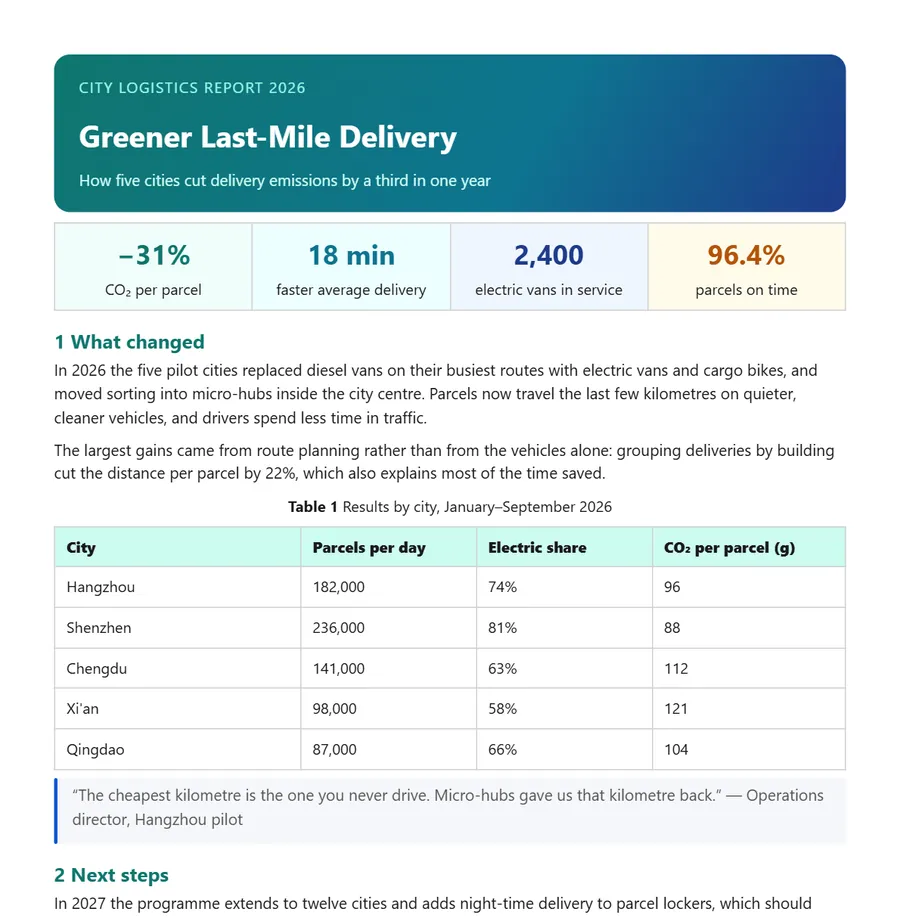
# Greener Last-Mile Delivery
How five cities cut delivery emissions by a third in one year

## 1 What changed
In 2026 the five pilot cities replaced diesel vans on their busiest routes with electric vans and cargo bikes, …

**Table 1** Results by city, January–September 2026
| City | Parcels per day | Electric share | CO₂ per parcel (g) |
|---|---|---|---|
| Hangzhou | 182,000 | 74% | 96 |
| Shenzhen | 236,000 | 81% | 88 |
| Chengdu | 141,000 | 63% | 112 |
Questions
How is this different from copying the text?
Copying gives you plain text. Extraction keeps the headings, paragraphs, tables and images and how they relate, as structured data a program can read.
Is the recognition accurate?
PDFs with a text layer and Office files are read directly. Scans and images are recognised; check numbers and tables against the original.
Do I need an account?
Yes. Sign in with an OmniDoc account; signing up is free. Only you can see the files you upload and their results.
What are the limits of the free version?
Up to 21 pages per PDF and no monthly cap; free jobs wait in a queue. For longer files or when you are in a hurry, the OmniDoc desktop app has no page limit and no queue.
Do I need to install anything?
No, it runs in the browser. For long files, or when you are in a hurry, use the OmniDoc desktop app for Windows, macOS or Linux.
Try it now
Up to 21 pages per PDF and no monthly cap; free jobs wait in a queue. For longer files or when you are in a hurry, the OmniDoc desktop app has no page limit and no queue.
Start extracting for freeGet the desktop app